TL;DR
- Problem: In my copies of Hornblower, the first six episodes are 4:3 at 720×480. I wanted one of them to fill a 16:9 screen at 1080p without cropping, stretching, or altering a single original pixel.
- Approach: Generate only the missing sides with a video outpainting model (Wan2.1 VACE 1.3B), shot by shot, then restore the whole widened frame to 1920×1080 with SeedVR2 7B. The original picture is pasted back exactly and checked on every frame.
- Constraints: No cloud. Two GPUs that both had other jobs: an RTX A6000 shared with my local LLM and voice projects, and the RTX 4090 in the PC I game on. At the model’s default settings, the widening alone extrapolated to roughly 25 days on one GPU.
- Result: All 93 minutes (167,473 frames) widened, restored, encoded, and validated in 9 days, through 35 interruptions. The 4090 generated 77% of the widening between gaming sessions. About 350 GPU-hours in total.
- My role: Personal project, start to finish. I designed the pipeline, made the quality calls, built the two-machine scheduler, and ran it around my life: pausing for games, heat, and other work.
Overview
Hornblower is the ITV naval drama that ran from 1998 to 2003. In the copies I have, the first six episodes are 4:3 standard definition: 720×480 at 29.97 frames per second, soft on a modern TV and boxed in by black bars. This project takes one of them, Episode 6, “Retribution,” and turns it into a 16:9 episode at 1080p.
Two very different AI models do the work. Wan2.1 VACE [1, 2], a video generation model used here for outpainting, invents what lies beyond the left and right edges of each frame, one shot at a time, conditioned on the real picture in the middle so the sides can follow the camera, the light, and the sea. Then SeedVR2 [3], a diffusion-based video restoration model, upscales the whole widened frame to 1920×1080. The real picture is never generated. After widening, the original pixels are pasted back exactly, and every frame is checked.
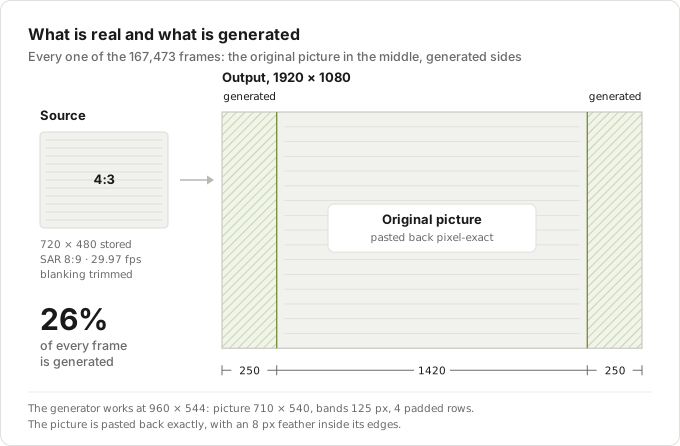
The hard constraint was compute. Widening is extraordinarily expensive, and the two GPUs that could do it both had day jobs. The A6000 in my Linux workstation also runs my local LLM server, a voice assistant stack, and the nightly ingestion job for Ask Veno. The RTX 4090 is in the Windows PC I game on. So the real project became a scheduler that splits one episode across two machines, lets either GPU leave at any moment, and loses nothing when it does.
The Problem
A 4:3 picture on a 16:9 screen leaves a quarter of the screen black. The usual fixes are bad: cropping throws away the top and bottom of every shot, and stretching makes everyone wide. I wanted the honest version: keep every original pixel where it is, generate only what is missing, and then fix the second problem, resolution, by restoring the whole frame to 1080p.
The geometry makes the size of the ask concrete. After trimming a few pixels of analogue blanking, the original picture becomes the middle 1420 × 1080 of a 1920 × 1080 frame. The 250 pixels on each side, 26% of every frame, have to be invented, for 167,473 frames.
They also have to hold up in motion. Generating frames independently would flicker. Video generation models produce short clips (81 frames here, under three seconds), and generating each clip independently would make the sides jump at every clip boundary. The clips within a shot have to be chained so the sides continue instead of restarting.
The source had its own trap. The frames are progressive, but their frame-to-frame differences repeat in a six-frame cycle: the signature of a 25 fps production converted to 29.97 by blending frames. Inverse telecine can’t undo blending and deinterlacing would only soften the picture, so the frames go in exactly as decoded.
Then the cost. My first measurements put one 81-frame clip at about 14 minutes on the A6000 at the model’s default 50 sampling steps. For an episode that extrapolates to roughly 25 days of widening before a single frame is restored, and restoration adds about four more days.
Constraints
- Local only. No cloud GPUs and no paid services. Everything runs on hardware I own.
- Two GPUs, both shared. The RTX A6000 (48 GB, 300 W) sits in my Linux workstation (Ryzen 9 7950X) and also hosts my local LLM server, my voice assistant stack, and Ask Veno’s nightly Whisper job. The RTX 4090 (24 GB) is in my Windows gaming PC (Ryzen 9 9950X3D, 64 GB), reachable only through WSL2 over SSH, and I play games on it.
- Tight memory on the borrowed card. The widening model peaked around 19 GiB, on a 24 GB card that also drives my desktop.
- Interruption is the normal case. Games, heat, other projects, reboots, driver resets. A GPU leaving must cost nothing: no lost work, no redone work, no babysitting.
- The original picture is sacred. The real pixels must come out exactly as they went in, and the generated sides must not restart at clip boundaries.
- Delivery has to match the source. Same frame count, timing, audio, and chapters, verified rather than assumed.
Phase 1: Inspecting the Source Before Touching a GPU
Every decision that changes the picture is made up front, with evidence images, and recorded in the job: the blanking crop, the timeline (every decoded frame at a constant 29.97 fps), and the scan type (progressive, as decoded). Shot detection found 1,168 hard cuts, so the episode is 1,169 shots.
The job’s ID is a hash of its full specification: the source, every decision, and every model setting. A job resumed a week later can’t silently change its crop, its models, or its step count, because a different spec is a different job.
Restoration works in units of about 20 seconds (a 599-frame target, cut at hard cuts, with 12 frames of context), 279 units for the episode, each stored as a lossless FFV1 [4] file with a checksum. Every stage after this one is a resumable state machine over windows and units, recorded in a single JSON state file.
Phase 2: Generating Only What Is Missing
The widening model is Wan2.1-VACE-1.3B [5], run with the VACE and Wan2.1 code [6, 7] at pinned revisions. It works on a 960 × 544 canvas. The 710 × 540 picture sits in the middle, the 125-pixel bands on each side start as flat grey, and four padding rows round the height up to a size the model accepts. A mask says “generate” over the bands and “keep” over the picture.
The episode is generated in windows: clips of up to 81 frames within a shot. Each window after the first starts with the last 17 frames of the previous window’s generated output, marked as known, so the bands continue from where they left off instead of being reinvented every 2.7 seconds. Shots are independent of each other, which later made them the natural unit to split across machines.
# Simplified: windows of one shot run in order, on one GPU.
# Each starts from the previous window's last 17 generated frames,
# so the sides continue instead of restarting.
previous = None
for window in shot.windows:  # up to 81 frames each
    known = previous[-17:] if previous is not None else None
    canvas = vace.generate(center=window.original_frames, context=known,
                           steps=25, seed=SEED_BASE + window.index)
    previous = canvas
    save(composite(canvas, window.original_frames))  # original pasted back
Every window gets the same prompt: “The scene continues naturally beyond the left and right edges of the frame: the same setting, lighting, colour, film grain, perspective and camera motion. Realistic and unobtrusive, no text, no logos, no added people.” Each window’s seed is fixed by its index, so any window can be regenerated exactly on the same GPU.
Sampling runs at 25 steps (UniPC solver [8], shift 16, guidance 5). Few-step tests on this episode, using NVIDIA’s rCM distillation [9] as a 4-step LoRA [10], came back with flat, featureless side panels; 25 steps was my call on the quality-versus-time trade, at roughly half the default cost.
After generation, the exact original picture goes back over the middle, with an 8-pixel feather inside its edges to hide the seam. The pipeline then checks every frame of every unit and confirms that the picture outside the feather is unchanged. All 279 units passed.
Phase 3: Restoring the Whole Frame
SeedVR2, ByteDance Seed’s one-step successor to SeedVR [11], restores the widened canvas to 1920×1080. I used the 7B model [12] in NumZ’s fp16 packaging [13], run through NumZ’s standalone CLI [14], with batches of 45 frames, 4 frames of temporal overlap, and LAB color correction. Earlier benchmarks had shown the 7B model only about 15 to 18% slower than the 3B, so the bigger model won easily.
The 7B model needed up to 41 GiB of GPU memory per unit, which settled the division of labor before any scheduling: only the A6000 can restore. Restoring everything on one GPU with one set of settings also keeps the look consistent from the first scene to the last.
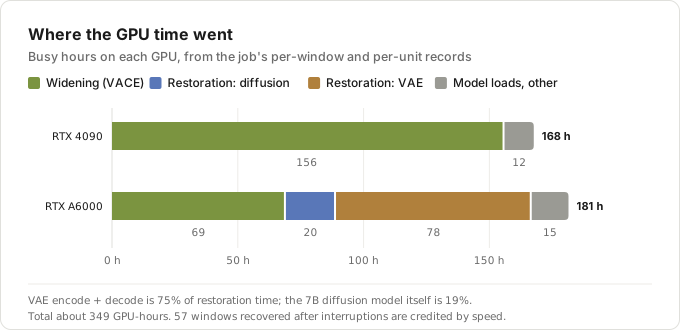
Restoration ran at a median of 2.17 seconds per frame, 101 hours for the episode. The per-phase timings held a surprise. The 7-billion-parameter diffusion transformer, the part everyone talks about, used only 19% of restoration time. Encoding frames into latents and decoding them back through the VAE took 75%. If I ever optimize this stage, that is where to look.
Phase 4: One Queue, Two Machines
The scheduler treats shots as the unit of work. One queue holds the episode’s 2,919 windows, grouped by shot, and each GPU takes whole shots from it.
The two lanes have different jobs. The A6000’s lane restores any unit whose windows are all finished, and widens only when there is nothing ready to restore. The 4090’s lane only widens. That split keeps the A6000 on the work only it can do while the 4090 feeds it.
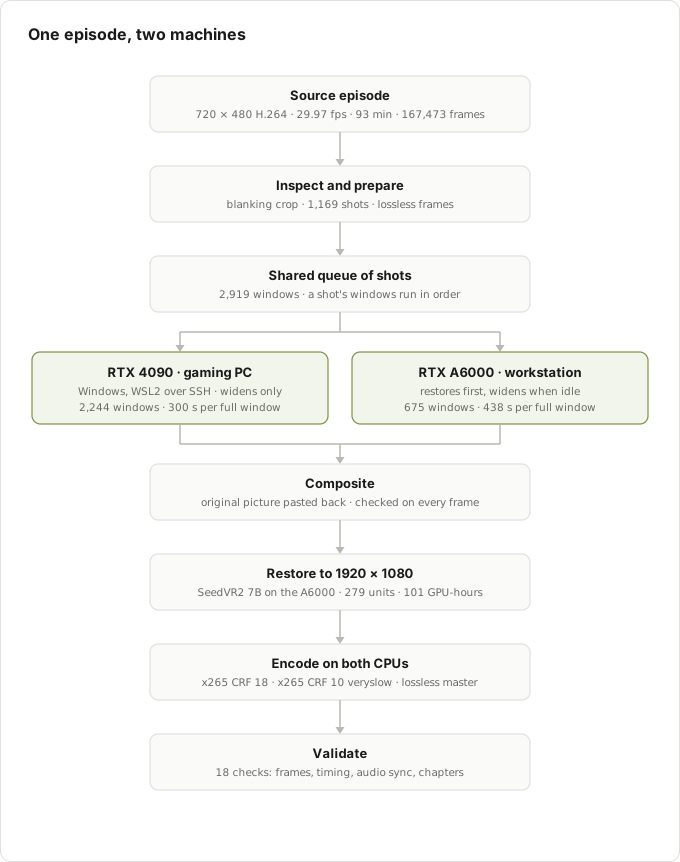
The remote side runs over SSH into Windows, then into WSL2. The workstation keeps the source and the job; for each batch it sends the exact center frames and a batch file with rsync, and a persistent worker on the gaming PC generates the windows. The worker loads the model once per run and caches prompt encodings. Every window that comes back is verified (frame count, size, decodability, checksum) and cached. A failed batch goes back in the queue, a host that fails three times is dropped for the run, and every batch carries the SHA-256 of the worker code. A host running a different version refuses the batch rather than produce subtly different output.
The 4090 turned out to be the better widening card: 300 seconds per full 81-frame window against 438 on the A6000. It generated 2,244 of the 2,919 windows (77%), while the A6000 spent most of its time restoring.
Getting there took two fixes on the borrowed card:
- 24 GB is not 24 GB on a desktop. On Windows, running out of GPU memory doesn’t make a CUDA job fail: the driver falls back to shared system memory, and the job just gets slower [15]. Watching a video on that PC pushed windows from about 300 seconds to 400, and heavier desktop use made them 3 to 9 times slower. The fix was at the source: offload the diffusion model to system RAM while the VAE runs, and keep VACE’s control-hint tensors in a list instead of re-stacking them after every block. Peak memory dropped to 16.3 GB with bit-identical frames.
- A Windows-shaped bug. The SSH login shell on the gaming PC is
cmd.exe, which caps a command line at 8,191 characters [16]. A batch of 28 or more windows produced a fetch command longer than that, so finished work couldn’t come home. Switching torsync --files-fromfixed it. About six hours of 4090 output was salvaged rather than regenerated. Because VACE regenerates a window bit-identically on the same GPU, I could verify the salvage instead of trusting it.
Phase 5: Designing for Interruption
This is the phase that made the project possible on shared hardware. Over 9 days and 4 hours, the job was started 37 times and interrupted 35 times. Both GPUs were fully stopped for 36 hours in total. Out of 220 hours, the A6000 was on the job for 177 and the 4090 for 171.
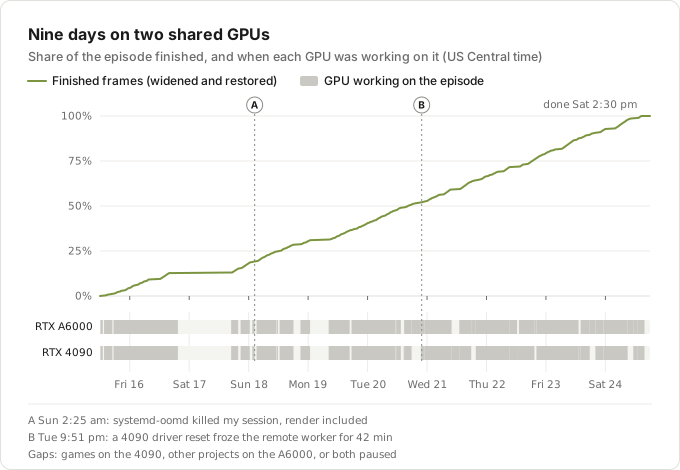
The core mechanism is a pause at a boundary. When the job is paused, each GPU finishes the window or unit it is working on, records it, and exits. On resume, the job re-checks every finished file against its checksum (about 275 GiB by the end) and continues exactly where it stopped. From day 4 on, when this went in, a pause cost nothing but the restart.
On top of that, either GPU can be lent out without stopping the episode:
# Each GPU finishes the window or unit it is on, then stops
image-upscaling pause --at-boundary

# Free the 4090 for games: the A6000 widens and restores alone
image-upscaling resume --background --local-only

# Lend the A6000 out: the 4090 keeps widening
image-upscaling resume --background --remote-only

# Both GPUs again
image-upscaling resume --background
I took the 4090 back five times, for games and other use, and took the A6000 back four times for other work. The nightly Ask Veno job was handled the same way: its 4 a.m. wrapper would pause the render at a boundary only if a new stream actually needed the GPU for Whisper, then resume it. As it happened, no new streams arrived during those nine days, so it never had to fire.
The failures were the educational part:
- The night the OOM killer took everything (marker A). At 2:25 a.m. on the third night, systemd-oomd [17] decided my user session was under memory pressure and killed all of it: the render, the desktop, every user service. Two things had piled up. SeedVR2’s save step converted every frame of a 745-frame unit to floating point at once, about 23 GB, while a large parallel test and review run was going on the same machine. The cost was one unit and the 4090’s in-flight batch; the 4090’s finished windows were salvaged. The fixes: a parallel PNG writer that never holds that float copy, and renders resumed from a login-session scope that oomd doesn’t police. When my session came back, my LLM server, enabled to start at login, helpfully grabbed 47 GB of the A6000. Shared hardware, in one anecdote.
- The driver reset that didn’t crash anything (marker B). A display-driver reset on the 4090 (Windows resets a GPU that stops responding [18]) froze the remote worker mid-window: still alive, GPU idle, 16.6 GB held. Nothing failed, so nothing retried, and the job waited 42 minutes. I added a stall watchdog that stops a worker that has been silent for too long (15 minutes at first, later 5) and re-queues its batch. Six more resets followed over the next day and a half, four of them at stock clocks. From then on, a frozen worker could hold up the run for no longer than the timeout.
- A Windows reboot mid-batch. The batch’s download timed out, the scheduler re-queued it with backoff, and a fresh worker picked it up. Cost: about 45 minutes of 4090 time, and the run recovered on its own.
- The last shot. The final shot was 21 windows long, and because windows within a shot are sequential, the A6000 held it while the 4090 sat idle. A boundary pause right after the A6000’s 12th window handed the remaining nine to the 4090 while the A6000 restored the last units.
Even the progress estimate needed fixing. Counting finished windows made “time left” read hours early, because the windows left near the end were longer than average. Estimating from frames, at each GPU’s measured seconds per frame, was much closer.
Phase 6: Squeezing Two Cards
With the scheduler stable, the remaining gains came from the hardware itself.
The A6000 runs into its power limit, not its clocks. It is capped at 300 W, its maximum, and spent 88% of the time at that cap, which is why its clocks swung between about 1,500 and 1,800 MHz. On the automatic fan curve it also sat at 85 °C and was in thermal slowdown 38% of the time. Pinning the fan at 100% brought it to 72 °C with no thermal slowdown at all, and made both restoration and widening about 3% faster (2.105 against 2.170 seconds per frame restoring; 428 against 442 seconds per window widening). Small, but over days it adds up to hours.
The 4090 rewarded a careful overclock. On full 81-frame windows, stock clocks ran 11.53 seconds per sampling step. +150 MHz on the core and +500 on the memory, with the fans locked at 100%, ran 10.96, about 5% faster, with no resets. The one batch at +1000 on the memory ran slower, 13.6 to 14.0 seconds per step, consistent with GDDR6X quietly retrying memory errors instead of crashing. +200 on the core bought nothing over +150.
Heat is a scheduling input. Two GPUs running flat out for days turned my apartment into a sauna, and at least one pause existed purely to let it cool down.
Three things I tried didn’t help:
- The Ryzen AI Max+ 395 tablet from my Thunderbolt cluster experiment, with 64 GB of its unified memory given to its Radeon 8060S. With ROCm in WSL and MIOpen’s 3D convolutions bypassed (they fell back to a naive kernel), it ran a window correctly, in 3,231 seconds against 296 on the 4090: 11 times slower. Its output also differed, most likely because random number streams differ between GPU models. In the test window, the tablet added a man in a blue coat where the 4090 had painted a vase and a pillar, despite the prompt’s “no added people.” It would have added about 5% throughput for a lot of setup.
- An RTX 2080 Ti. 11 GB is under the 16.3 GB peak, and Turing has no bf16. Not without rewriting the precision path.
- The CPUs. About 97% idle during the GPU stages, but CPU inference would be roughly 30 to 70 times slower. Their turn came at the end.
Phase 7: Three Encodes and a Validator
The job’s own final encode is x265 [19] at CRF 18 (preset medium, 10-bit): a 6.0 GB file, encoded in 72 minutes. Even that taught me something. It first crawled along at 13 frames per second, because the max-quality encodes I had started on the same machine were competing for the CPU, even at the lowest scheduling priority. x265 runs many threads that wake constantly, and on a CPU saturated with low-priority threads that loses badly. Pausing them brought the encode to 47 frames per second, 3.6 times faster. nice is not isolation.
Since I care about quality over file size, two more versions came from the same restored frames:
- Max quality: x265 at CRF 10, preset veryslow, tuned for film grain. On one machine that is about 30 hours of CPU. Split into 279 chunks, one per unit, and spread over both machines’ CPUs (two encodes on each, same FFmpeg [20] and x265 build on both), it started overnight while restoration was still running and finished the afternoon the render did. Every chunk was checked before it counted: decoded frame count, timestamps on the frame grid, a keyframe first, and the same encoder parameter sets and x265 options as a reference chunk. A self-test beforehand had confirmed the two machines produce identical decoded pictures. The chunks were joined with exact per-chunk durations, without re-encoding, into a 42.8 GiB file at about 66 Mb/s.
- A lossless master: every restored unit joined without re-encoding into a 286 GiB FFV1 RGB file, the reference for anything I make later.
When I wanted to watch streams on the gaming PC during the encode, its chunks were capped to 24 of its 32 threads:
taskset -a -p -c 0-23 "$pid" # all its threads on 24 of 32 logical CPUsThis doesn’t change the encode settings, because x265 sizes its thread pool from the system’s CPU count [19], not the process affinity. It chose the same thread layout and options as for every other chunk, and the first capped chunk passed the same checks.
Both encodes then go through the job’s 18-check validation: one video stream at 1920×1080, 10-bit 4:2:0, BT.709; 167,473 decoded frames at 30000/1001; start at zero and audio offset 0.0 ms; duration within a millisecond of the source; at most 1.03 ms of deviation from the ideal frame grid; the AC-3 audio stream, its language, and its duration matching the source; all 20 chapters at matching start times; and a content-alignment check against the source. Both passed. The lossless master got a full decode check of its own (frame count, audio, chapters) and passed too.
Outcome
Episode 6 of Hornblower now exists as a 16:9, 1080p episode in which every original pixel is untouched and the sides are new. The original picture is exact, the generated 26% continues through each shot instead of restarting every clip, and the file matches the source’s timing, audio, and chapters.
| Measure | Value |
|---|---|
| Episode | 93 minutes · 167,473 frames · 1,169 shots |
| Widening | 2,919 windows: 2,244 on the RTX 4090, 675 on the RTX A6000 |
| Restoration | 279 units · 101 hours on the RTX A6000 |
| GPU time | about 349 hours (4090: 168, A6000: 181) |
| Wall clock | 9 days, 4 hours · 37 starts · 35 interruptions |
| Deliverables | 6.0 GB (CRF 18) · 42.8 GiB (CRF 10, veryslow) · 286 GiB lossless master |
The number I keep coming back to is the first estimate: roughly 25 days of widening at the defaults on one GPU. The whole episode finished in nine days on two GPUs that both kept their day jobs, while I gamed, worked, and slept through most of it.
What I Learned
- Design for interruption first. Boundary pauses, checksummed resumes, and lendable lanes are why 35 interruptions cost almost nothing. On shared hardware, the scheduler is the product.
- Split work where the dependencies are. Windows within a shot depend on each other; shots don’t. Distributing whole shots made a two-GPU, two-OS setup simple and kept every generated band continuous.
- A consumer GPU on a desktop isn’t its spec sheet. The driver falls back to system memory instead of failing, so a “24 GB” card behaves like a much slower one once the desktop wants some. Headroom mattered more than TFLOPS, and the fix was reducing peak memory, not buying any.
- Measure before you optimize. SeedVR2 is VAE-bound: three quarters of restoration time, versus under a fifth in the transformer.
- Determinism stops at the GPU model. The same window regenerates bit-identically on the same GPU, which made salvage verifiable. A different GPU produces a different sample, as the man in the blue coat demonstrated.
- Silent failures need watchdogs. A frozen worker never errors. A stall timeout caps what was a 42-minute hang at 5 minutes.
niceis not isolation. Low-priority encodes still made a latency-sensitive encode 3.6 times slower.- Cooling is performance on a power-capped card. A fan curve change was worth 3% on the A6000, and memory overclocks can lose speed without ever crashing.
- More hardware isn’t always more throughput. The tablet was 11 times slower and the 2080 Ti couldn’t fit the model; the best extra compute was making the two real cards efficient.
- Keep the original pixels sacred, and prove it. Checking the untouched picture on every frame made “the original is exact” a measured fact rather than a hope.
Technical Stack
- Wan2.1 VACE 1.3B [5]: video outpainting at 960 × 544, 81-frame windows chained with 17 frames of generated context, 25 UniPC steps [8], T5 text encoder on CPU
- SeedVR2 7B [12, 13] through the pinned NumZ standalone CLI [14]: restoration to 1920×1080, batches of 45 frames, LAB color correction
- Python orchestration: hash-identified jobs, a JSON state machine over windows and units, a two-lane shot scheduler, boundary pause and resume, lendable lanes, stall watchdog, worker SHA-256 pinning
- Remote execution: SSH into Windows, WSL2, rsync with
--files-from, a persistent worker per run - FFmpeg [20], x265 [19], FFV1 [4], Matroska: lossless units, three encodes (one chunked across two machines), and an 18-check validator
- Hardware: RTX A6000 48 GB with a Ryzen 9 7950X (Linux workstation); RTX 4090 24 GB with a Ryzen 9 9950X3D (Windows gaming PC, WSL2)
References
- Zeyinzi Jiang, Zhen Han, Chaojie Mao, Jingfeng Zhang, Yulin Pan, Yu Liu. “VACE: All-in-One Video Creation and Editing.” arXiv:2503.07598, 2025. arxiv.org/abs/2503.07598
- Team Wan (Ang Wang, Baole Ai, Bin Wen, Chaojie Mao, et al.). “Wan: Open and Advanced Large-Scale Video Generative Models.” arXiv:2503.20314, 2025. arxiv.org/abs/2503.20314
- Jianyi Wang, Shanchuan Lin, Zhijie Lin, Yuxi Ren, Meng Wei, Zongsheng Yue, Shangchen Zhou, Hao Chen, Yang Zhao, Ceyuan Yang, Xuefeng Xiao, Chen Change Loy, Lu Jiang. “SeedVR2: One-Step Video Restoration via Diffusion Adversarial Post-Training.” ICLR 2026. arXiv:2506.05301. arxiv.org/abs/2506.05301
- M. Niedermayer, D. Rice, J. Martinez. “FFV1 Video Coding Format Versions 0, 1, and 3.” RFC 9043, IETF, 2021. rfc-editor.org/rfc/rfc9043
- Wan-AI. Wan2.1-VACE-1.3B. Hugging Face model (Apache 2.0); revision
574e6a7used here. huggingface.co/Wan-AI/Wan2.1-VACE-1.3B - ali-vilab. VACE source code; commit
48eb44fused here. github.com/ali-vilab/VACE - Wan-Video. Wan2.1 source code; commit
9737cbaused here. github.com/Wan-Video/Wan2.1 - Wenliang Zhao, Lujia Bai, Yongming Rao, Jie Zhou, Jiwen Lu. “UniPC: A Unified Predictor-Corrector Framework for Fast Sampling of Diffusion Models.” NeurIPS 2023. arXiv:2302.04867. arxiv.org/abs/2302.04867
- Kaiwen Zheng, Yuji Wang, Qianli Ma, Huayu Chen, Jintao Zhang, Yogesh Balaji, Jianfei Chen, Ming-Yu Liu, Jun Zhu, Qinsheng Zhang. “Large Scale Diffusion Distillation via Score-Regularized Continuous-Time Consistency” (rCM). ICLR 2026. arXiv:2510.08431. arxiv.org/abs/2510.08431
- Kijai. WanVideo_comfy. Hugging Face repository; its rCM LoRA for Wan2.1-T2V-1.3B (
Wan_2_1_T2V_1_3B_480p_rCM_lora_average_rank_64_bf16.safetensors, revision8260d42) was used only in the few-step test. huggingface.co/Kijai/WanVideo_comfy - Jianyi Wang, Zhijie Lin, Meng Wei, Yang Zhao, Ceyuan Yang, Fei Xiao, Chen Change Loy, Lu Jiang. “SeedVR: Seeding Infinity in Diffusion Transformer Towards Generic Video Restoration.” CVPR 2025. arXiv:2501.01320. arxiv.org/abs/2501.01320
- ByteDance Seed. SeedVR2-7B and SeedVR2-3B. Hugging Face models, the official weights (Apache 2.0). huggingface.co/ByteDance-Seed/SeedVR2-7B, huggingface.co/ByteDance-Seed/SeedVR2-3B
- numz. SeedVR2_comfyUI. Hugging Face repository of fp16 SeedVR2 weights;
seedvr2_ema_7b_fp16.safetensorsandema_vae_fp16.safetensors(revision09ced71) were used here. huggingface.co/numz/SeedVR2_comfyUI - numz. ComfyUI-SeedVR2_VideoUpscaler: SeedVR2 for ComfyUI, with a standalone CLI; commit
4490bd1used here. github.com/numz/ComfyUI-SeedVR2_VideoUpscaler - NVIDIA. “System Memory Fallback for Stable Diffusion.” NVIDIA support article on the CUDA system memory fallback added in driver 536.40. nvidia.custhelp.com
- Microsoft. “Command prompt line string limitation.” Microsoft Learn. learn.microsoft.com
- systemd. systemd-oomd.service(8) manual page. freedesktop.org
- Microsoft. “WDDM Support for Timeout Detection and Recovery (TDR).” Microsoft Learn. learn.microsoft.com
- x265. “Threading.” x265 documentation. x265.readthedocs.io
- FFmpeg project. FFmpeg. ffmpeg.org