Overview
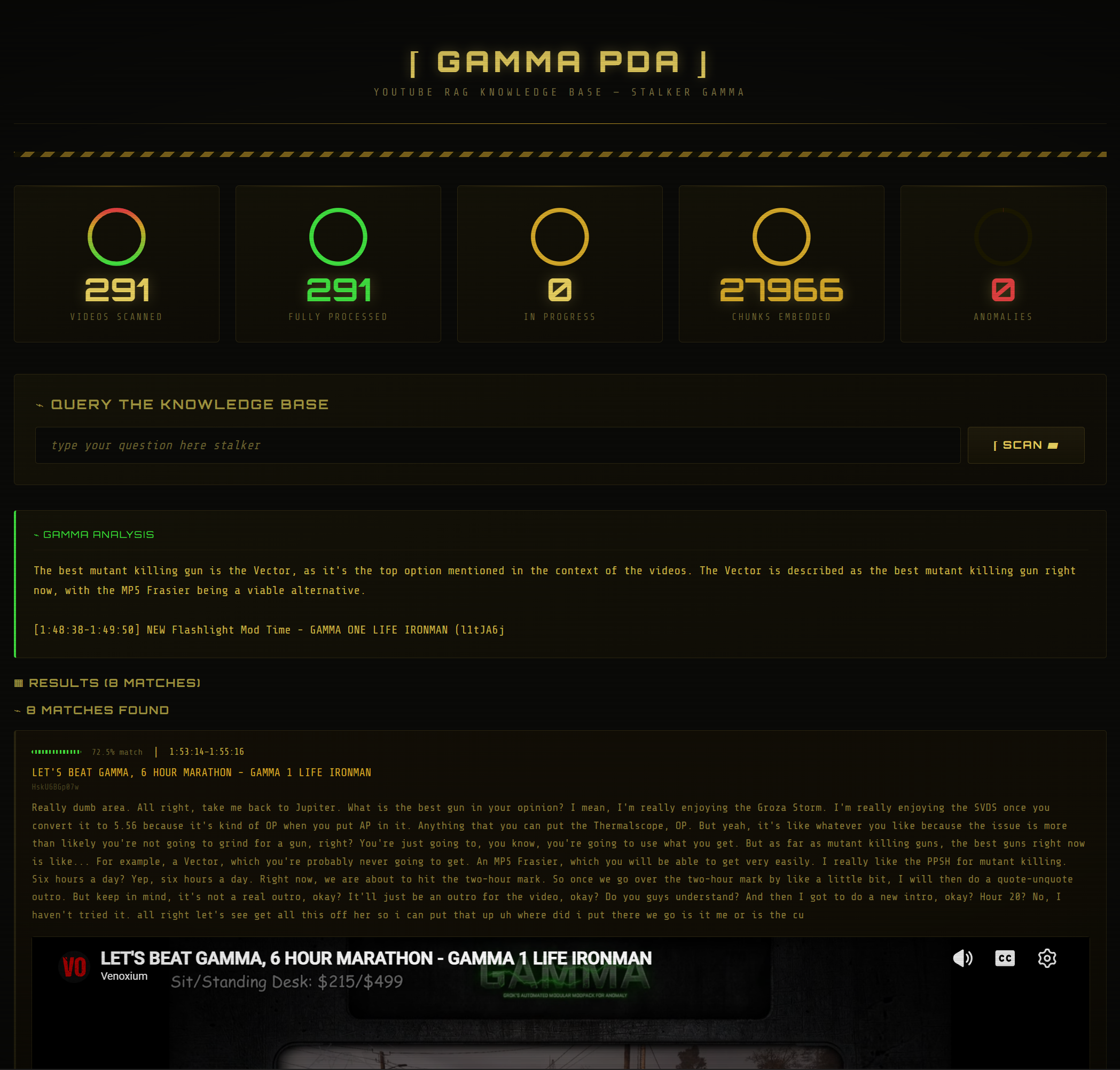
Ask Veno is a fully offline retrieval-augmented generation (RAG) system built around two distinct knowledge sources behind one interface. The first is a YouTube channel’s entire livestream archive — audio download, Whisper transcription, chunking, embedding. The second is the authoritative item database of the game those streams are about (S.T.A.L.K.E.R. GAMMA 0.9.5): 1,786 items canonicalized from an upstream open-data project into SQLite, with full provenance. Both are served through a FastAPI dashboard styled as an in-game PDA: amber phosphor glow, CRT scanlines, and all.
Ask a question and a deterministic router decides which corpus should answer it. “What is the magazine capacity of the AK-74?” goes to the database and comes back with the exact canonical record. “What happened when Veno entered Radar?” goes to the stream archive and comes back with timestamped clips. “What are the AK-74 stats and how does Veno use it?” hits both — and the answer explicitly labels which facts came from the database and which from the streamer. Retrieval is hybrid at every layer: exact alias lookup first, then BM25 (SQLite FTS5) and dense vectors fused with Reciprocal Rank Fusion, with one controlled query-rewrite retry when evidence comes back weak.
The whole thing runs on my own hardware. No cloud APIs, no paid services, no data leaving the machine — and nothing but local components at query time: yt-dlp → faster-whisper → ChromaDB + SQLite FTS5 → Ollama, orchestrated by SQLite state machines. The current index covers 299 videos / 28,692 transcript chunks and 1,786 game items / 7,362 retrieval documents, processed end to end with zero anomalies.

The Problem
A YouTube channel I follow has hundreds of hours of livestreams — long, unstructured, and completely unsearchable. The knowledge in them is real (what happened in which playthrough, what settings were used, how a particular situation was handled), but the only way to find anything was to remember roughly which multi-hour stream it happened in and scrub through it.
YouTube’s own search doesn’t reach inside videos. Auto-generated captions exist but aren’t queryable as a corpus. What I wanted was simple to state and annoying to build: ask a question in plain language, get a direct answer, and jump to the exact timestamp in the exact video where that answer comes from.
I also wanted the pipeline to be honest about its own scale. Hundreds of long videos means days of transcription compute, flaky network downloads, and a process that will be interrupted. A naive script that starts at video 1 and dies at video 83 wasn’t going to cut it. The pipeline had to be resumable by design.
Constraints
- Fully local. No cloud transcription, no hosted embeddings, no LLM APIs. The entire pipeline — download, transcription, embedding, retrieval, generation — had to run on hardware I own.
- Long-running, interruptible work. Transcribing hundreds of multi-hour streams takes days of GPU time. Every stage had to be pausable and resumable without losing or duplicating work.
- Flaky inputs. YouTube downloads fail, rate-limit, and occasionally demand fresh authentication. The pipeline needed to tolerate partial failures and pick up where it left off.
- Mixed hardware budget. One GPU (RTX A6000) worth reserving for the genuinely GPU-bound stage — Whisper. Everything else — embeddings, vector search, LLM inference, the web app — had to run acceptably on CPU (Ryzen 9 9950X).
- Answers need receipts. A summary alone is worthless for this use case. Every answer had to link back to specific videos at specific timestamps so the source is one click away.
- Single-user simplicity. This is a personal tool. No auth, no multi-tenancy, no deployment infrastructure — but it still had to feel polished enough that using it is a pleasure, not a chore.
Phase 1: A SQLite State Machine for Ingestion
The foundation of the pipeline isn’t a model — it’s a SQLite registry. Every video discovered on the channel gets a row, and every processing stage is a status field on that row. Each stage of the pipeline is a queue processor: it queries for rows in the right state, processes a bounded batch, and advances the status.
Discovery uses yt-dlp’s flat extraction for fast channel scans, filters videos by title substring (the channel mixes content types, and I only wanted a specific series), then enriches the matches with full metadata:
# Discovery — scan the channel, match by title, persist candidates.
# yt-dlp extract_flat=True makes the channel scan fast; only matched
# videos get a full metadata fetch.

python scripts/discover_audio_candidates.py \
    --channel-url "https://www.youtube.com/@channel/streams" \
    --title-filters "ONE LIFE,1 LIFE"
Each downstream stage follows the same pattern — select by state, process, advance:
discovered → audio_ready → transcript_ready → transcript_clean_ready → complete
              (yt-dlp)     (faster-whisper)      (cleanup)             (ChromaDB)
Every processor defaults to handling one video per invocation, with flags to raise the batch size. That sounds conservative, but it’s the point: a single run_pipeline_once.py pass advances every queue by a small amount, can be killed at any time, and a cron-driven daily job keeps the index current as new streams are published. Nothing is ever half-done in a way the registry can’t see — if a stage crashes mid-video, the status field never advanced, and the next run simply retries it.
Phase 2: Whisper Transcription on the GPU
Transcription is the only stage that earns the GPU. The queue processor loads faster-whisper large-v3 once, then works through queued audio files with batched inference (float16, batch size 8, beam size 5), voice-activity-detection filtering to skip silence, and word_timestamps=True for per-word timing.
The word-level timestamps are not a nice-to-have — they’re the feature. Every downstream chunk keeps its start time, which is what makes “jump to the exact moment in the video” possible at the end of the pipeline.
# Transcription queue — load the model once, drain the queue.
# word_timestamps=True is what makes timestamp deep-links possible later.

model = WhisperModel("large-v3", device="cuda:0", compute_type="float16")

for video in queued_videos:  # ingest_status='audio_ready'
    segments, info = model.transcribe(
        video.audio_path,
        word_timestamps=True,
        vad_filter=True,
        beam_size=5,
    )
    write_transcript_json(video, segments)
    mark_transcribed(video)  # whisper_status='transcribed'
Raw Whisper output is verbose — tokens, probabilities, segment internals. A separate cleanup stage strips each transcript down to what retrieval actually needs: start, end, text per segment. Keeping cleanup as its own queue stage (rather than folding it into transcription) meant I could re-run it across the whole corpus when I changed the cleaning rules, without re-transcribing anything.
Phase 3: Chunking and Embedding into ChromaDB
Cleaned transcripts are chunked by tokenizer token count — 512 tokens per chunk with 25% overlap — not by characters or sentences. Chunking in the embedding model’s own token space means every chunk actually fits the model’s context window, and the overlap keeps answers that span a chunk boundary retrievable from either side.
Each chunk records the timestamp of its first segment and pre-computes a youtube_time_url — the video URL with &t=<seconds> baked in. The deep-link is stored as metadata at index time, so the query path never has to reconstruct it.
Embeddings come from intfloat/multilingual-e5-large, running on CPU. E5 models expect asymmetric prefixes — passage: for indexed text, query: for searches — and getting this detail right measurably improves retrieval:
# Embedding queue — chunk in token space, embed with E5 passage prefix,
# store with timestamp metadata for deep-linking.

chunks = chunk_by_tokens(transcript, max_tokens=512, overlap=0.25)

embeddings = embed_model.encode(
    [f"passage: {c.text}" for c in chunks],
    batch_size=32,
)

collection.add(
    ids=[c.chunk_id for c in chunks],
    embeddings=embeddings,
    documents=[c.text for c in chunks],
    metadatas=[{
        "video_id": c.video_id,
        "title": c.video_title,
        "start_s": c.start_s,
        "youtube_time_url": f"{c.video_url}&t={int(c.start_s)}s",
    } for c in chunks],
)
ChromaDB persists to local disk, and embedding is — like every other stage — a resumable queue: a video only flips to complete once its chunks are committed to the collection.
Phase 4: Retrieval and Local LLM Answers
The query path inverts the pipeline. A question is embedded with the E5 query: prefix, ChromaDB returns the top 5 chunks by similarity, and a local LLM turns them into a direct answer.
Generation runs on qwen3:0.6b via Ollama, on CPU. A 0.6B-parameter model sounds almost comically small, but the job here is narrow: synthesize five retrieved transcript chunks into a few sentences. Retrieval does the heavy lifting; the LLM is a summarizer, not an oracle. Keeping it small means answers come back in seconds on CPU while the GPU stays free.
One design decision that took iteration: the LLM does not handle citations. Early versions asked the model to cite its sources inline, and a small model does that badly — malformed links, wrong attributions. The fix was to remove the responsibility entirely. The model only writes the summary; the application renders the sources itself as a clickable list below it, built directly from the chunk metadata. The links can’t be wrong because the model never touches them.
# Query path — E5 query prefix, top-5 retrieval, local summarization.
# The LLM writes the answer; the app renders the sources. Never both.

emb = embed_model.encode(f"query: {question}")
res = collection.query(query_embeddings=[emb], n_results=5,
                       include=["documents", "metadatas", "distances"])

context = "\n\n".join(chunk.text for chunk in res)
summary = ollama_generate(
    model="qwen3:0.6b",
    prompt=f"Question: {question}\n\nSource chunks:\n{context}\n\nAnswer:",
)

return summary, [c.metadata["youtube_time_url"] for c in res]
If Ollama isn’t running, the dashboard degrades gracefully: retrieval still works, results still render with their deep-links, and a status LED in the header flips from SYNTH ONLINE to SYNTH OFFLINE.
Phase 5: The PDA Dashboard
The interface started as a single-file FastAPI application — routes, templates, and styling in one web_app.py. For a single-user tool, one file beats a frontend build pipeline: no bundler, no node_modules, nothing to deploy but python web_app.py. (When the system later grew a second corpus, that file was refactored into small app/, rag/, storage/, and presentation/ modules behind a compatibility entrypoint — with a characterization test suite written first, so the refactor provably changed nothing.)
The design brief was a S.T.A.L.K.E.R. GAMMA PDA, because the best RAG interface for a corpus of Zone survival streams is one that feels like it survived the Zone:
- Phosphor glow — subtle
text-shadowon text elements, mimicking CRT phosphor excitation - Scanlines — a CSS gradient overlay on a pseudo-element, no images
- Circular progress rings — SVG stat dials showing pipeline completion at a glance
- Inline playback — clicking a result card expands an embedded player at the exact timestamp the chunk came from
- A spinning ☢ loader — because Ollama inference on CPU takes a few seconds, and the wait should be in character
The dashboard also doubles as the pipeline’s monitoring surface: the video archive table shows every ingested stream with its status, chunk count, duration, and upload date, driven by the same SQLite registry the queue processors use. There is exactly one source of truth about pipeline state, and both the CLI tools and the UI read it.
Phase 6: A Second Corpus — the GAMMA 0.9.5 Item Database
Transcripts tell you what the streamer said; they can’t reliably tell you what the game’s numbers are. So the system grew a second, authoritative corpus: the complete GAMMA 0.9.5 item database, synchronized from an upstream open-data project (stalker-anomaly-gamma-db, AGPL-3.0) via a sparse git checkout — never copied into the repo, always attributed, and hard-pinned to version 0.9.5 in code.
The interesting work was canonicalization. The upstream export is 61 JSON files of game-engine reality: translation-key indirection, display-formatted stat strings ("82%"), relationship files that reference items by three different key schemes, and engine markup embedded in description text. A deterministic Python builder (no LLM anywhere in ingestion) joins all of it into a canonical SQLite database — 1,786 items, 6,880 aliases, 57,768 typed relations (ammo compatibility, crafting, disassembly, trader stock, drops, upgrades) — every record keeping its raw source values and per-file provenance. A hard-gated audit fails the build on duplicate IDs, coverage loss, or unaccounted manifest files; ambiguities upstream actually contains (orphan references, missing translations) are counted and reported instead of silently guessed away.
Each item is then rendered into deterministic natural-language facets — overview, stats, compatibility, crafting, disassembly, obtaining, upgrades — that get embedded into a versioned Chroma collection named by the upstream manifest hash. Rebuilds are staged and atomic: the new SQLite and collection are built and validated next to the live ones, then activated with a single os.replace(). A failed build can never leave a half-corpus serving traffic, and an unchanged upstream manifest turns the daily sync job into a sub-second no-op instead of a 27-minute re-embed.
Phase 7: Hybrid Retrieval, Routing, and One Controlled Retry
With two corpora, “embed the query and take the nearest neighbors” stops being good enough. The GAMMA side retrieves in layers, cheapest and most precise first:
- Exact alias lookup — query n-grams matched against normalized item names, internal IDs, and translated aliases (“AK-74” resolves to the AK-74N even though no alias matches exactly, via a digit-gated prefix rule that can never fire on ordinary words). Exact hits contribute protected canonical facets that later stages can’t rank away.
- BM25 over facet text (SQLite FTS5 — already in the stack, no new infrastructure) and dense E5 vectors, fused by rank with Reciprocal Rank Fusion — no fragile score normalization between incomparable scales.
- An optional cross-encoder reranker — more on that below.
Corpus routing is deterministic, not an LLM call: explicit streamer intent, mechanic/stat vocabulary, item-category nouns, recommendation phrasing, and exact item resolution decide between the archive, the database, or both — in about a hundred lines of testable Python with a manual override in the UI. When initial evidence comes back weak (no hits, or a model-number-like term that resolved to nothing), the query is rewritten once by the local LLM under a strict JSON contract and retried once — the retry is kept only if it’s measurably stronger, and every failure path falls back to the original query. No agent loop, no unbounded retries.
The old transcript-only path still exists untouched: a regression suite pins corpus=transcripts to a recorded pre-expansion baseline — same chunk IDs, same order, same similarity values, byte for byte.
Phase 8: An Evaluation Harness Instead of Vibes
Every retrieval claim above is backed by a 64-question gold dataset grounded in the actual corpora — GAMMA answers extracted from the built database (magazine sizes, weights, prices, crafting ingredients), transcript answers tied to specific verified chunks, plus routing edge cases, ambiguous item terms, and questions the system should refuse. A deterministic harness (no LLM judges) measures routing accuracy, recall/MRR, fact coverage in evidence, combined-corpus coverage, rewrite rate, and latency across five system variants — legacy dense, dense-only, BM25-only, hybrid, hybrid + reranker.
It caught real bugs before any user did: possessive forms breaking intent detection, trailing punctuation breaking exact lookup, a prefix rule that matched “join” to an item called Cannabis Joint, and stats facets that didn’t contain the item’s weight. After fixes: routing 64/64, item recall and evidence fact-coverage 1.0, and hybrid BM25+RRF beating pure dense retrieval on transcript search (video recall 0.625 vs 0.563, MRR 0.51 vs 0.36) at a ~110 ms retrieval p50.
The harness also killed a feature. The cross-encoder reranker — the fashionable thing to add — measured zero quality improvement on the gold set while adding ~220 ms per query, so it ships disabled behind a flag. Measuring first meant finding out the boring answer was the right one.
Outcome
The system does the thing: ask a question about 299 livestreams — hundreds of hours of unstructured talk — or about any of 1,786 game items, and get a direct, source-labeled answer in a few seconds, entirely offline. Stream answers carry clickable timestamps; database answers carry exact canonical values with provenance back to the upstream files; combined answers keep the two visibly separate so a streamer’s opinion never masquerades as official game data. Daily jobs keep both corpora current — the YouTube pipeline ingests new streams, and the GAMMA job re-syncs upstream and rebuilds only when the data actually changed.
The pipeline’s resumability paid for itself many times over during the initial backfill. Downloads failed, authentication expired, the machine was needed for other work mid-run — and none of it mattered, because every interruption just meant running the pipeline again. The registry knew exactly what was done. The same discipline carried into the second corpus: staged builds, atomic activation, and a rollback collection retained after every rebuild.
And honestly: the PDA theme is what makes it a tool I actually open. Utility gets a project used once; character gets it used daily.
What I Learned
- State machines beat scripts for long-running ingestion. The SQLite registry — explicit per-stage statuses, bounded batches, idempotent processors — is the difference between a pipeline that survives interruption and one that has to be babysat. This pattern transfers to any multi-stage ingestion problem.
- Small local models are enough when retrieval does the work. qwen3:0.6b produces genuinely useful answers because it’s never asked to know anything — only to summarize five well-retrieved chunks. Scoping the LLM’s job narrowly is what made CPU inference viable.
- Don’t let the LLM touch structured output it can’t reliably produce. Moving citations out of the prompt and into application code eliminated an entire class of malformed-link failures. If the application can render something deterministically, the model shouldn’t be generating it.
- Chunk in token space, not character space. Chunking by the embedding model’s own tokenizer (512 tokens, 25% overlap) guarantees chunks fit the model and behave consistently across languages and vocabulary.
- E5 prefixes matter.
passage:at index time,query:at search time — an easy detail to miss, and retrieval quality visibly suffers without it. - Timestamps are the product. The direct answer is nice; the
&t=deep-link into the source video is what makes the tool trustworthy. Carrying word-level timing from Whisper all the way through to chunk metadata was worth the plumbing. - Spend the GPU where it counts. Reserving CUDA for Whisper and running embeddings and inference on CPU was the right split — transcription is the only stage where GPU time changes the outcome from “days” to “hours.”
- Exact lookup before vectors. When a query names an entity your system has a canonical record for, semantic search is the wrong first tool. Resolving “AK-74 magazine capacity” to the item’s actual database row — and protecting those facts through fusion and reranking — is what makes numeric answers exact instead of approximately retrieved.
- Rank fusion beats score normalization. BM25 scores and cosine similarities live on incomparable scales; RRF sidesteps the whole problem by fusing on ranks. Twenty lines of code, fully testable, no tuning theater.
- Keep the LLM out of the control plane. Routing is keyword-and-lookup Python, ingestion is deterministic, and the one place the LLM touches retrieval (query rewriting) is bounded to a single strictly-validated attempt with fallback. Every decision the system makes is reproducible.
- An evaluation harness is how features earn their place. The gold set caught four real retrieval bugs and vetoed the reranker with a number, not an opinion. “Grounded in the actual corpus” is the part that matters — a gold set you can’t verify is a vibe with extra steps.
- Atomic activation makes rebuilds boring. Staging the new database and collection next to the live ones and swapping with
os.replace()means a failed build is a log line, not an outage.
Technical Stack
- FastAPI — modular dashboard (PDA theme, corpus selector, dual evidence cards, inline playback, pipeline stats)
- ChromaDB — persistent local vector store (28,692 transcript chunks across 299 videos + a versioned 7,362-facet GAMMA collection)
- SQLite — canonical GAMMA 0.9.5 item database (items/aliases/relations with provenance), FTS5 BM25 indexes for both corpora, and the pipeline state registries
- intfloat/multilingual-e5-large — embeddings for both corpora, CPU
- Ollama (qwen3:0.6b) — local answer generation and bounded query rewriting, CPU
- faster-whisper (large-v3) — batched GPU transcription with word timestamps
- yt-dlp — channel discovery and audio extraction
- Deterministic retrieval core — exact alias resolution, Reciprocal Rank Fusion, keyword/lookup routing, optional cross-encoder (measured, shipped disabled)
- Evaluation — 64-question corpus-grounded gold set; routing, recall/MRR, fact-coverage, and latency across five system variants
- Hardware — NVIDIA RTX A6000 (transcription), AMD Ryzen 9 9950X (everything else)