Why I Built This
I recently met with an NVIDIA AI Solution Architect who recommended that I learn four areas: TensorRT, TensorRT-LLM, Dynamo, and parallelism strategies. Rather than only reading documentation, I wanted to build a small hands-on project that I could explain clearly in an interview.
The goal was to serve a real LLM using NVIDIA TensorRT-LLM, benchmark basic latency and throughput behavior, and connect the work to production serving concepts like prefill, decode, KV cache, Dynamo, and parallelism strategies.
This was intentionally scoped as a single-GPU project. I wanted a finished, reproducible artifact that demonstrated the serving path end-to-end before moving into more complex distributed inference topics.
Hardware and Environment
- GPU: NVIDIA RTX A6000, 48 GB VRAM
- Container:
nvcr.io/nvidia/tensorrt-llm/release:1.1.0 - Serving stack: TensorRT-LLM
trtllm-serve - API style: OpenAI-compatible
/v1/chat/completions - Host port:
8001 - Container port:
8000
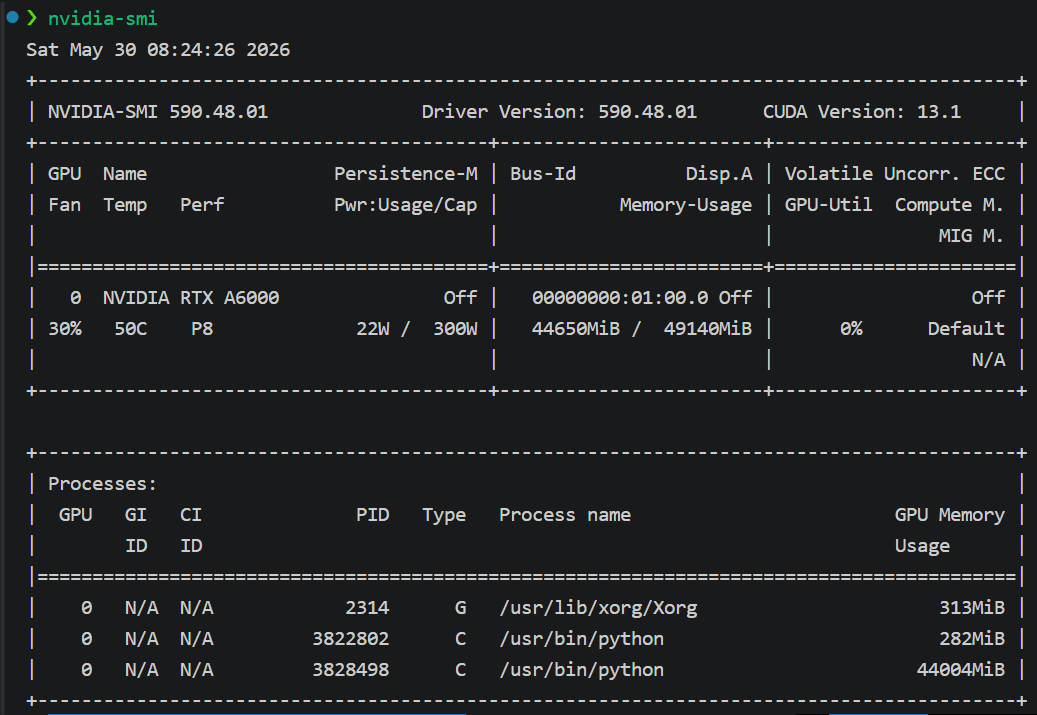
RTX A6000 visible during the TensorRT-LLM serving run.
Milestone 1: Docker GPU Passthrough
Before debugging TensorRT-LLM, I validated that Docker could see the GPU using an NVIDIA CUDA container and nvidia-smi.
This confirmed that the RTX A6000 was visible inside containers and that the NVIDIA container runtime was working correctly.
This step mattered because it separated Docker/GPU/runtime issues from TensorRT-LLM issues. Once GPU passthrough worked, I knew any remaining problems would likely be in the model server, port mapping, model loading, or request format.
Milestone 2: TinyLlama Smoke Test
I first served TinyLlama/TinyLlama-1.1B-Chat-v1.0 as a low-risk smoke test.
The goal was not performance. The goal was to validate the serving path:
- TensorRT-LLM container launched
trtllm-servestarted successfully/v1/modelsresponded/v1/chat/completionsgenerated a response/metricsand/versionwere available
Starting with a tiny model helped reduce variables. Instead of immediately debugging a larger model, I first proved that the container, server, port mapping, and OpenAI-compatible endpoint were working.
Milestone 3: Qwen2.5-7B-Instruct
After the TinyLlama smoke test succeeded, I switched to Qwen/Qwen2.5-7B-Instruct as the main model.
The model successfully served through TensorRT-LLM and responded through the OpenAI-compatible chat completions endpoint.
This was the main serving milestone: a real 7B-class instruct model running through TensorRT-LLM on a single RTX A6000.
Non-Streaming Benchmark Results
I first ran a simple non-streaming benchmark against the OpenAI-compatible chat completions endpoint.
The benchmark measured total request latency, prompt tokens, completion tokens, and average tokens per second.
| Test | Prompt Tokens | Completion Tokens | Avg Latency (s) | Avg Tokens/sec |
|---|---|---|---|---|
| short_prompt_128 | 33 | 78 | 1.76 | 44.37 |
| short_prompt_256 | 36 | 256 | 5.74 | 44.62 |
| long_prompt_256 | 2222 | 256 | 5.79 | 44.24 |
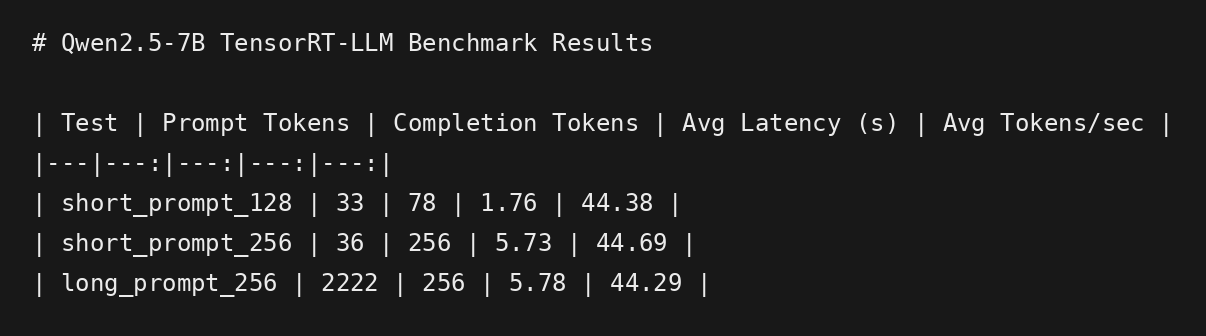
Non-streaming benchmark results for Qwen2.5-7B-Instruct served through TensorRT-LLM on an RTX A6000.
What the Non-Streaming Benchmark Shows
The non-streaming benchmark showed stable decode throughput around 44 tokens/sec for Qwen2.5-7B-Instruct on the RTX A6000 through TensorRT-LLM.
The short 256-token and long 256-token tests had very similar average latency, despite the long test having 2,222 prompt tokens. In this small test, total latency appeared to be dominated mostly by generating the 256 output tokens rather than prompt processing.
That observation was useful, but incomplete. A non-streaming request only gives total end-to-end latency. It does not cleanly separate time-to-first-token from decode time.
To better understand prefill and decode behavior, I added a streaming benchmark.
Streaming Time-to-First-Token Benchmark
The streaming benchmark measured approximate time-to-first-token, decode time, and total latency.
| Test | Avg TTFT (s) | Avg Decode Time (s) | Avg Total Latency (s) |
|---|---|---|---|
| stream_short_prompt_256 | 0.045 | 5.682 | 5.726 |
| stream_long_prompt_256 | 0.048 | 5.730 | 5.778 |
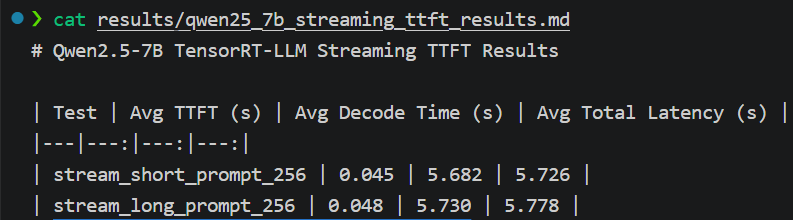
Streaming time-to-first-token results for Qwen2.5-7B-Instruct served through TensorRT-LLM on an RTX A6000.
The streaming benchmark showed very low time-to-first-token in both the short and long prompt tests. The long prompt test did not materially increase TTFT in this warm, single-user setup.
The dominant latency component was decode time, which stayed around 5.7 seconds for a 256-token response. That lines up with the non-streaming benchmark, where Qwen2.5-7B-Instruct generated at roughly 44 tokens/sec.
The important caveat is that this was a small, warm, single-user benchmark. It does not prove that prefill is unimportant. In production, longer contexts, higher concurrency, larger batch sizes, and KV cache pressure can change the bottleneck.
That is exactly why production serving systems care about batching, KV cache management, prefill/decode separation, and scale-out frameworks like Dynamo.
Prefill, Decode, and KV Cache
LLM inference has two major phases: prefill and decode.
Prefill is the phase where the model processes the input prompt and builds the key/value cache. This phase affects time-to-first-token, especially for long prompts or large batches of prompt tokens.
Decode is the phase where the model generates output tokens one at a time using the existing KV cache. This phase affects tokens/sec and total generation latency.
The KV cache is important because it prevents the model from recomputing attention over the entire previous context for every new token. However, it also consumes GPU memory. That memory pressure becomes more important with many users, long contexts, long generations, and concurrent requests.
In this local benchmark, decode dominated the measured latency. In a larger production setting, the bottleneck can shift depending on prompt length, request concurrency, model size, batching behavior, and how KV cache is managed.
Why This Leads to Dynamo
This project used a single GPU and a single TensorRT-LLM server. That is a useful local baseline, but production serving introduces harder problems:
- Many concurrent users
- Long prompts
- Long generations
- GPU memory pressure from KV cache
- Need for routing and batching
- Different scaling needs for prefill and decode
- Need to coordinate multiple workers or multiple GPU pools
That is where Dynamo becomes relevant.
Dynamo is the scale-out serving layer that helps coordinate distributed inference, including ideas like prefill/decode disaggregation and KV-aware routing.
The way I think about the progression is:
Single GPU:
  TensorRT-LLM serves one model on one machine.

Production scale:
  Dynamo coordinates many workers, routes requests, and manages serving behavior across a larger inference system.
My local project does not recreate a production Dynamo deployment. Instead, it gives me a concrete baseline for explaining why systems like Dynamo matter once single-server inference is no longer enough.
Parallelism Strategies
The main parallelism strategies I would discuss from this project are:
- Data parallelism: replicate the model across workers to handle more concurrent requests.
- Tensor parallelism: split model computation across GPUs.
- Pipeline parallelism: split model layers across GPUs.
- Expert parallelism: distribute mixture-of-experts experts across GPUs.
For this project, I intentionally stayed single-GPU. That kept the demo reproducible and focused. The point was to build a working serving baseline, then explain how the concepts scale.
This also helped clarify when parallelism is actually needed. If the model fits on one GPU and traffic is low, a single-GPU serving path may be enough for a demo or prototype. As model size, concurrency, latency requirements, or context length increase, parallelism and distributed serving become more important.
Key Takeaway
The most useful part of this project was not just getting a model to respond. It was seeing the serving stack end-to-end:
- Docker GPU passthrough
- TensorRT-LLM container startup
- OpenAI-compatible serving
- TinyLlama smoke testing
- Qwen2.5-7B model validation
- Non-streaming latency and tokens/sec measurement
- Streaming time-to-first-token measurement
The result gave me a concrete baseline for discussing how single-GPU LLM serving works, and why production systems need more advanced architecture: batching, routing, KV cache management, prefill/decode separation, and scale-out orchestration with frameworks like Dynamo.
Interview Takeaway
If I had to summarize this project in an interview, I would say:
I built a single-GPU TensorRT-LLM serving benchmark on my RTX A6000. I validated Docker GPU passthrough, served TinyLlama as a smoke test, moved to Qwen2.5-7B-Instruct, measured total latency and tokens/sec, then added streaming measurements to separate approximate time-to-first-token from decode time. The exercise helped me understand where TensorRT-LLM fits locally and why Dynamo matters at production scale for routing, KV cache management, and prefill/decode disaggregation.
What I Would Improve Next
- Add concurrency tests with multiple simultaneous users.
- Compare TensorRT-LLM against llama.cpp or vLLM on the same model.
- Try a larger model or quantized variant.
- Add more aggressive prompt-length tests to stress prefill behavior.
- Explore Dynamo after the single-node baseline is complete.
Final Thoughts
This was a small project, but it gave me a useful mental model for NVIDIA’s inference stack.
TensorRT-LLM is where I can run and optimize LLM inference locally. Dynamo is where the conversation moves when serving becomes distributed, multi-worker, and production-scale. Parallelism strategies explain how models and workloads are split when one GPU or one server is no longer enough.